
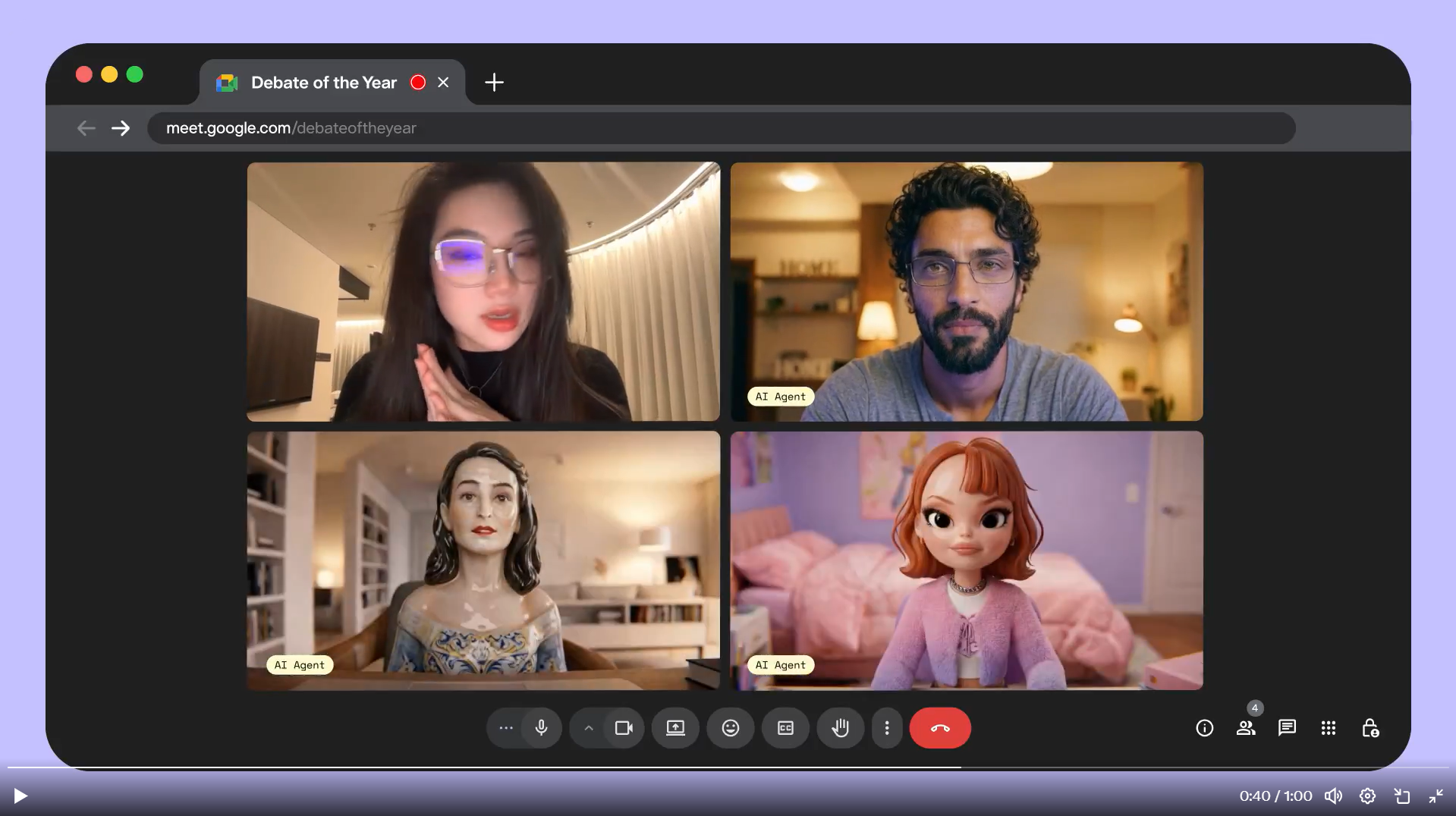
Pika Labs has introduced a new real-time model called PikaStream 1.0 that allows users to interact with AI agents over video calls.
At first glance, this may sound like a simple upgrade to voice assistants. In reality, it signals a shift where AI is no longer just something you type to. It becomes something you can talk to, see, and interact with in real time during conversations.
What PikaStream 1.0 Actually Does
PikaStream 1.0 is designed to enable live video-based interaction with AI agents. According to Pika Labs, the system supports persistent memory, personality, and real-time adaptability during conversations.
Users can also create their own AI versions, referred to as “Pika AI Self,” which can join calls and participate alongside them. But this is not limited to Pika’s own AI. PikaStream 1.0 works with any AI agent, including Claude, OpenClaw, or any other agent you already use. You simply drop a Google Meet link to your agent, and it joins the call as a real-time avatar.
Beyond just talking, the agent can also perform actions during the call. This is the part most coverage is missing. It is not a passive listener. It can execute tasks in real time while the conversation is happening.
The system also supports voice cloning and avatar generation, meaning the AI on the call can be made to look and sound like you, or like a custom character entirely.
One more detail worth knowing: PikaStream uses workspace context awareness. Before joining a call, the agent synthesizes information about your identity, recent activity, and known people into its system prompt, so its responses feel informed rather than generic.
This is currently released as a beta feature, which means performance may vary, and occasional glitches are expected. It also involves credits, and the system checks your balance before joining a call.
The Shift
Beyond the focus on the feature itself, the more important shift is behavioral.
Until now, AI assistants were tools you paused your workflow to use. With PikaStream, AI becomes something that exists inside your workflow.
That changes how people use it.
Instead of asking a chatbot a question, you can have an ongoing conversation where the AI listens, responds, and adapts as the discussion evolves. This removes the stop-and-start nature of traditional AI interaction.
Real-World Use Cases That Feel Actually Practical
The biggest impact shows up in everyday scenarios rather than flashy demos.
- A freelancer on a client call could have their AI present in the meeting, helping summarize points, suggest responses, or keep track of tasks without switching tabs.
- A student attending an online lecture could interact with an AI in real time, asking follow-up questions without interrupting the session.
- In team environments, an AI agent could act as a passive participant that remembers context across meetings, something human participants often struggle with over time.
These use cases are simple, but they reflect a real shift in how AI fits into daily work.
The Subtle but Important Limitation
There is one important detail that determines whether this becomes widely useful or not.
Timing:
Real-time interaction is not just about generating responses. It is about responding at the right moment, with the right tone, without breaking the flow of conversation.
Even small delays or unnatural interruptions can make the experience feel off. This is why the beta label matters. The concept works, but the experience will depend heavily on how smooth the interaction feels in practice.
It is also worth noting that PikaStream is currently developer-facing. The GitHub skill is built for coding agents and requires technical setup. Everyday non-technical users cannot simply download and start using it yet. Consumer availability may come later.
A More Honest Way to Think About It
Instead of thinking of PikaStream as a smarter chatbot, it is better to think of it as an early version of an AI participant.
- That distinction matters.
- A chatbot answers when asked.
- A participant listens, reacts, and contributes in context.
- PikaStream is trying to move AI into that second category.
What PikaStream 1.0 Actually Brings Together
| Feature | What It Means in Practice |
|---|---|
| Real-time video interaction | AI joins and participates in live calls |
| Works with any agent | Not locked to Pika — works with Claude, OpenClaw, others |
| Performs actions on call | Goes beyond talking — can execute tasks mid-conversation |
| Voice cloning | AI can sound like you or a custom voice |
| Avatar generation | AI appears on screen as a visual character |
| Workspace context awareness | Knows your identity, recent activity, and people on the call |
| Google Meet support | Confirmed working — just drop a Meet link to your agent |
| Beta + credits required | Not free, not consumer-ready yet |
Practical Tips Before You Use It
If you are planning to try or build around this, a few things can make a big difference.
- Start with low-stakes use cases like personal calls or internal meetings before relying on it in important conversations
- Be mindful of privacy, especially when bringing AI into calls that involve sensitive information
- Treat AI suggestions as assistive, not authoritative, especially in live conversations
- Expect occasional inconsistencies due to the beta nature of the feature
Why This Matters More Than It Seems
Video calls changed how people communicate online. This changes who can participate in those conversations.
With tools like PikaStream 1.0, AI is no longer limited to answering queries in isolation. It starts to exist alongside humans in shared environments.
That may sound like a small step, but it has long-term implications for work, collaboration, and how people interact with technology.
Final Takeaway
PikaStream 1.0 is not just about adding video to AI. It is about turning AI into something that can exist inside real conversations.
The technology is still early and clearly in a beta stage, but the direction is clear. AI is moving from a tool you use occasionally to something that can actively participate in your workflow.
How useful it becomes will depend less on raw intelligence and more on how naturally it fits into human interaction.
Frequently Asked Questions
1. Does PikaStream 1.0 only work with Pika’s own AI?
No. While Pika’s own “AI Self” feature supports it natively, PikaStream 1.0 is designed to work with any AI agent. Developers can download the skill from Pika’s GitHub and plug it into agents like Claude or OpenClaw.
2. Can the AI actually do things during a call, or just talk?
Both. The agent can hold a live video conversation and also perform actions during the call in real time. This is one of the more significant aspects of PikaStream that most early coverage has glossed over.
3. Is PikaStream 1.0 free to use?
Not entirely. The system uses a credits model. Before joining a call, it checks your balance and generates a payment link if you do not have sufficient credits. Pricing details are available inside the Pika platform.
4. Is this ready for everyday users right now?
Not quite yet. PikaStream 1.0 is currently in beta and is primarily developer-facing, requiring technical setup via GitHub. It works well for developers and early adopters, but a broader consumer-friendly version has not been announced yet.